How Much Water Does AI Scheduling Use? Not a Gallon
A group organizer told us their group was simply too large for a tool to help. The research on large groups says the opposite: size is exactly where manual scheduling breaks.
By Proximatic
A gallon of water? At Google's reported rate, one teaspoon covers about 19 Gemini text prompts.
We got both claims in one message this week. We'd asked an organizer who runs several groups how they collect availability and pick what meets next. Here's the reply:
Scheduling constraints are not caused by limitations of tools but rather my group simply being too large. I don't need an AI to waste a gallon of water to tell me that one player has finals coming up and another player is traveling to Europe for work.
Let's not dress this up: the message is wrong on both counts. As a group grows, scheduling tools become more useful, within their supported size and complexity limits. Blaming the group means blaming people for a job nobody should be doing in their head in the first place: holding twenty people's availability at once. At Google's reported May 2025 median Gemini text-prompt rate, a US gallon covers about 14,600 such prompts. That's per-prompt arithmetic, not a measured footprint for a scheduling task; the numbers and their limits are below.
1. A larger group is a harder search, and the search is the tool's job
Finals and work trips are the inputs to scheduling. They're not a separate reason it's hard. What's hard is how they combine.
Katherine Brown, Harsh Mathur and Onuttom Narayan studied the ordinary scheduling poll — a list of possible times, a group of people, each person busy for some of them. They published the work in The European Physical Journal B in 2024. Two findings matter here:
- In their model, the number of time slots needed for a reasonable chance of success grows exponentially as you add people.
- With 40 possible times and each person free for half of them, the chance of finding no shared time rises from 7.5% for four people to 28% for five.
You can check the feel of this yourself. Say each person is independently free on half the evenings you're looking at. In that example, the chance that one set evening works for all six of you is 1 in 64. For ten people, it's 1 in 1,024. Shared commitments can change those odds, but the example shows how the overlap shrinks as you add people.
Doing that check by hand means comparing every person with every time slot. Then one reply changes and you start over. That's the limitation, and it's the part a tool takes off you. Matching people to shifts under availability, role and workload rules is a studied problem in computing because people are slow at searching it unaided. A coordinator with a group chat and a spreadsheet is doing that search from memory, a bit at a time. A solver does it in full: every window, every rule, and a clear list of what's still uncovered. The mental tax of that work grows with the size of the group. It isn't a separate problem sitting next to group size. It is group size, felt by one person.
2. The tool doesn't need to know why someone is busy
Read the reply again. It assumes the software wants a story — finals, a trip to Europe — and then spends a gallon of water retelling it. The software doesn't want the story. It needs dates.
A finals week and a work trip go into a schedule the same way: this person is out for these dates. The reason doesn't change who can cover what. Asking for reasons just adds work for the organizer and shares more of the volunteer's life than the roster needs.
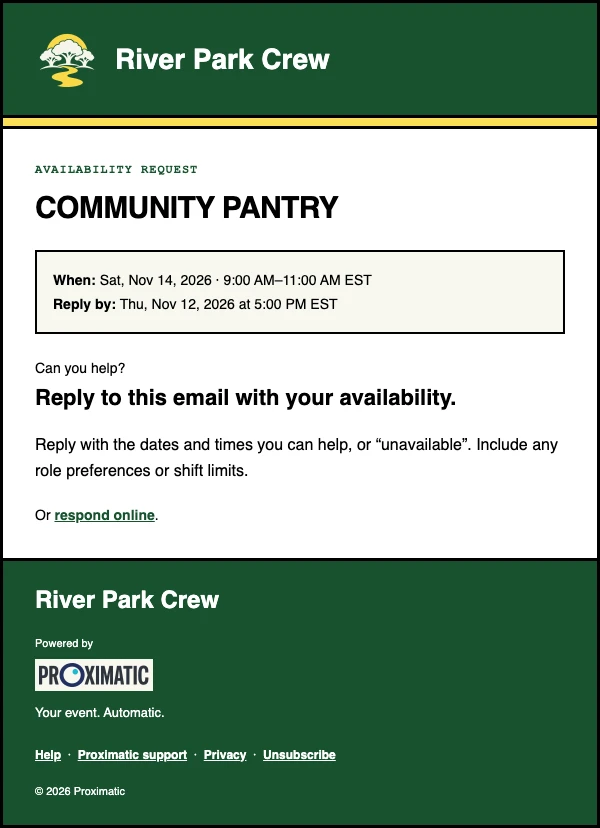
In Proximatic, each person gives their available dates and full hours. They can save them ahead of time, or, with Pro, reply to an availability email in their own words. The roster gets built from those times. Nobody has to explain a blocked day. Leave exam details and other personal reasons out of replies; dates and hours are enough.
Volunteers can answer Proximatic's availability request directly by email
And the output isn't "these two people are busy." You knew that already. The output is what you can still run: which shifts are covered, which one needs one more person, and who can take it without breaking a rule. That's the answer you need at 10pm the night before, and it's a harder answer to produce than a list of conflicts.
3. A large pool helps — once you stop requiring everyone
There is one version of "too large" that really can't be solved: every person at every session, no exceptions. No tool fixes that. It isn't a scheduling choice, it's a rule the group set for itself, and the math in Section 1 is the price of it.
Most events don't work that way. A pantry shift needs three of your twelve approved volunteers. A rehearsal needs its section leaders and enough people to run. A game needs its host and enough players. Once the need is a count and a mix — this many people, these roles, these two kept apart, this many hours max — a larger pool stops being the problem and starts being the help. More times to draw from. More ways to cover a gap. More room to spread the hours fairly instead of asking the same three reliable people every time until they stop answering.
Available times and saved rules turn a large pool into shift teams you can review.
Dinner has one open place: 2/3 filled
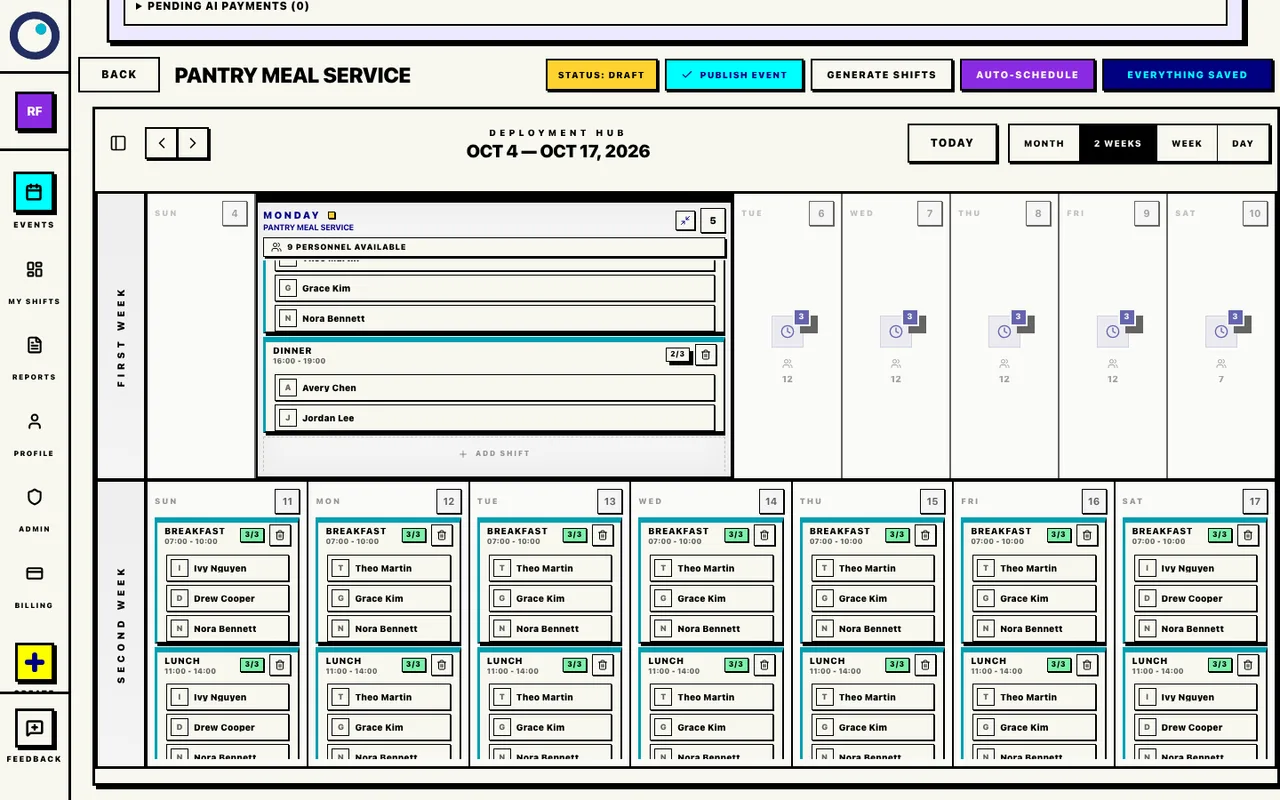
So set the need on the shift itself. Collect times, not reasons. Save the supported rules instead of holding them in your head. When availability changes, run Auto-Schedule on the Draft event when you are ready to replace its saved assignments, then review coverage and workload before publishing. Our Auto-Schedule guide walks through that on a real roster.
4. How much water does AI use? The gallon, checked
Google estimated 0.26 millilitres of data-centre cooling water for its median Gemini Apps text prompt in May 2025. Sam Altman separately reported about 0.32 millilitres for an average ChatGPT query in June 2025. Those are different workloads and statistics, not a range for every prompt. A US gallon is about 3,785 millilitres. Here's where the numbers come from:
- Google, published August 2025. Its May 2025 median Gemini Apps text prompt came out at 0.24 watt-hours and 0.26 millilitres of cooling water. Energy accounting included the host computer and memory, idle machines and data-centre overhead. The water estimate used fleet-average cooling water; it didn't include water used to generate electricity. Google reported a 33× fall in median prompt energy use between May 2024 and May 2025 and said the results hadn't been independently verified.
- OpenAI, June 2025. Sam Altman put an average ChatGPT query at 0.34 watt-hours and 0.000085 gallons of water. That's roughly 0.32 millilitres — about one-fifteenth of a teaspoon.
- Li et al. (2023), where the viral figure started. The UC Riverside paper behind the "bottle of water" headline estimated that GPT-3, a model from 2020, used a 500 ml bottle for roughly 10 to 50 medium-length responses, depending on when and where it ran. That's 10 to 50 ml per response, for older tech, worked out from a model of the data centre — not a gallon, and not per question.
Put that in kitchen terms. At Google's 0.26 ml per prompt, a roughly 5 ml teaspoon covers about 19 prompts. The gallon jug in the fridge covers about 14,600. In that arithmetic, one prompt a week would take about 280 years to use a gallon; one a day, about 40 years. At Altman's 0.000085 gallons per average query, a gallon covers about 11,800 queries. At 50 ml per response in the older GPT-3 estimate, it covers about 76 responses.
These estimates count different things: Google's cooling-water figure differs from the cooling plus electricity-generation water modelled by Li et al.; Altman's post doesn't give a comparable method. A task can also make several model calls. Proximatic hasn't measured water use per roster, so the prompt figures aren't a product benchmark.
The bigger concern is real. Training and hardware have their own costs. Billions of prompts add up. And where a data centre sits matters if the local water supply is already stretched. Those are good reasons to ask providers to publish what they count and what they leave out.
Check what a figure counts: the workload, cooling, electricity generation and date all affect the estimate.
5. And in Proximatic, the chatbot isn't the scheduler
The last thing the reply gets wrong is what "AI scheduling" means here. In Proximatic, a language model doesn't hand out the shifts:
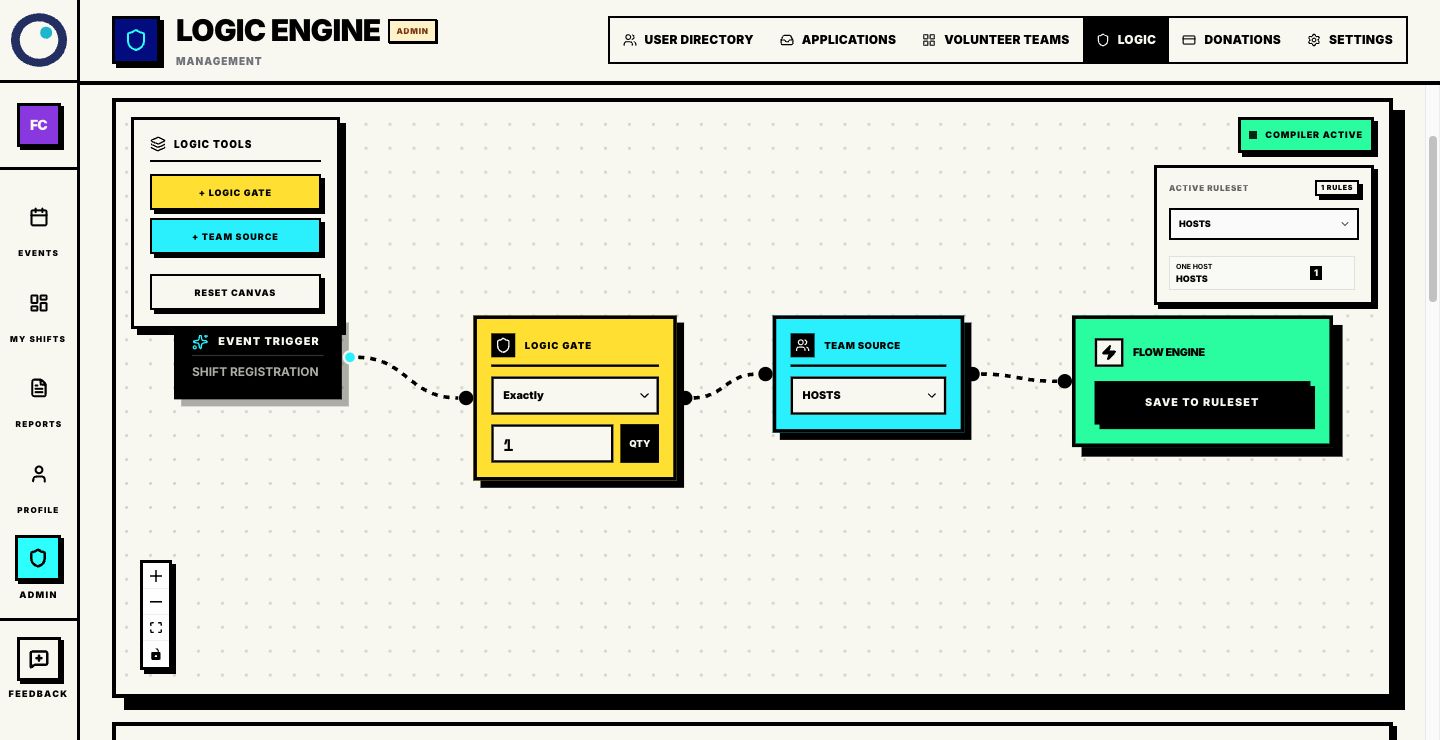
- You and your team supply the facts — approved people and roles, whole-shift availability, and team count or percentage rules on the rules canvas. Keep-apart relationships use a separate Organizer proposal that you review before saving. You can include workload limits in an Organizer roster request.
Set the staffing requirement before scheduling
- A constraint solver builds the roster. Auto-Schedule looks for assignments that fit the supplied times and supported rules, then reports coverage and open places. A successful direct run replaces saved assignments immediately. Check the saved roster before publishing; it can still have gaps, and a run can fail to find a solution. See how Auto-Schedule works.
- Language AI reads the input at the edges. It turns an event description into draft jobs and shifts, can turn Organizer requests into supported scheduling constraints, and, with Pro, reads availability replies into dates and hours. It needs times, not explanations of why someone is away. You review the result before publication. Manual assignment edits, ordinary public signup and check-in don't need a language-model call.
That split is on purpose, and it's the same line we drew in AI can help prepare an event; people still have to run it. Let the model read messy human replies. Let a solver do the searching. Keep the decision, and the publish button, with the organizer.
6. And Proximatic isn't just the scheduling step. It's the whole job.
Calling Proximatic "an AI" misses most of the product. The AI helps read the input. Everything around it is a full system for running the event, and it's built so the organizer does very little of the carrying:
- You describe the event once. Jobs, times, and how many people each shift needs. The draft event and shifts get built from that — you don't start from a blank grid.
- Proximatic collects the availability. With Pro, it emails your approved people. They reply in plain words and confirm their choices before those times can be used; unclear answers get a follow-up question. You review the roster instead of copying replies into a spreadsheet.
- The solver builds the roster. People get placed only where they're free, approved for the role, and inside the rules you saved. Open places stay visible as open places, with a name and a time attached.
- You review, then publish. Check assignments and open places before you publish. Publication starts requests for each assigned person to confirm their own shift. Participants can opt into reminders before their shift.
- Event day runs on the same roster. Check-in and check-out happen against the assignments, hours get recorded, and when someone drops out, Find cover looks for a replacement who fits — without rebuilding the whole plan.
Signups, attendance and hours stay with the same event from the first description to the final timesheet. That's the actual offer: not a chatbot with an opinion about your group, but the collecting, matching, confirming and recording — the work that used to sit in one person's head — done in one place, with you approving the result.
If your group feels too large to schedule
That feeling is worth listening to. In our experience it points at the process, not the people:
- Replace "everyone" with a number. Put the count and role mix each shift actually needs on the shift itself.
- Collect times, not reasons. Ask for dates and full hours. Let people keep the why.
- Save supported shift rules. Keep team mixes and relationship rules visible. Include a workload limit in an Organizer roster request when you need one.
- Check workload, not just coverage. A full roster that overloads two people is next month's gap. The fair scheduling guide shows the check.
- Rebuild instead of remembering. When availability changes, re-run the draft and review the difference, instead of patching a spreadsheet cell by cell.
A big group won't make the constraints go away. It makes holding all of them in one person's head the most expensive way to run the group — in time, in fairness, and in sessions that quietly stop happening. That's the part Proximatic is built to carry. Describe your event and preview the jobs and shifts it proposes. When your approved people and availability are ready, build and review the roster before publishing. Keep the human parts — the welcome, the judgement calls, the game itself — for the people.
Sources
- Google (August 2025), measuring the environmental impact of AI inference and its technical methodology: May 2025 median Gemini Apps text prompt; cooling-water estimate and full serving-energy accounting.
- Sam Altman (June 2025), The Gentle Singularity: average ChatGPT query, 0.34 Wh and 0.000085 gallons of water.
- Li, Yang, Islam and Ren (2023, revised 2025), Making AI Less "Thirsty": GPT-3 consumes a 500 ml bottle of water for roughly 10–50 medium-length responses, depending on when and where it is deployed.
- Brown, Mathur and Narayan (2024), Scheduling meetings: are the odds in your favor?, The European Physical Journal B: exponential slot scaling under the model; the 40-slot example compares four and five participants.