Fair Volunteer Scheduling: Rules Your Team Can Understand
Fair volunteer scheduling starts with the same clear requirements for everyone. Proximatic automatically builds assignments from people's availability and your saved staffing rules. Review the resulting commitments before publishing, so the hours fit what your volunteers have agreed to do. With Pro, collect available times by email and let the replies prepare the draft roster for that review.
Equal hours can be useful when people want equal commitments, but some volunteers want one shift and others are happy to take two. A fair roster gives you a clear reason for the assignments and a consistent way to handle changes.
Agree what a fair schedule should do
Before scheduling, decide:
- Which roles must be covered? State the required mix for each shift and approve people for the work they are ready to do.
- What can each person commit to? Collect their full available times and confirm whether they want one shift or are willing to take more.
- What exceptions matter? Agree requirements such as keeping two people on separate shifts, and use the same process when anyone requests a change.
To reduce favoritism, make these decisions visible and apply them consistently. Availability shows when someone can attend; it does not tell you how many hours they want.
Let Proximatic apply the staffing rules
Community Welcome needs Registration from 9–11am and 11am–1pm, with one host and two helpers on each shift. Volunteers belong to the approved Hosts or Helpers team and have supplied their available times.
Use the rules canvas to require one host and up to two helpers for each three-person shift. If Casey and Devon need separate shifts, save that requirement in their relationship rule.
Set the staffing requirement before scheduling
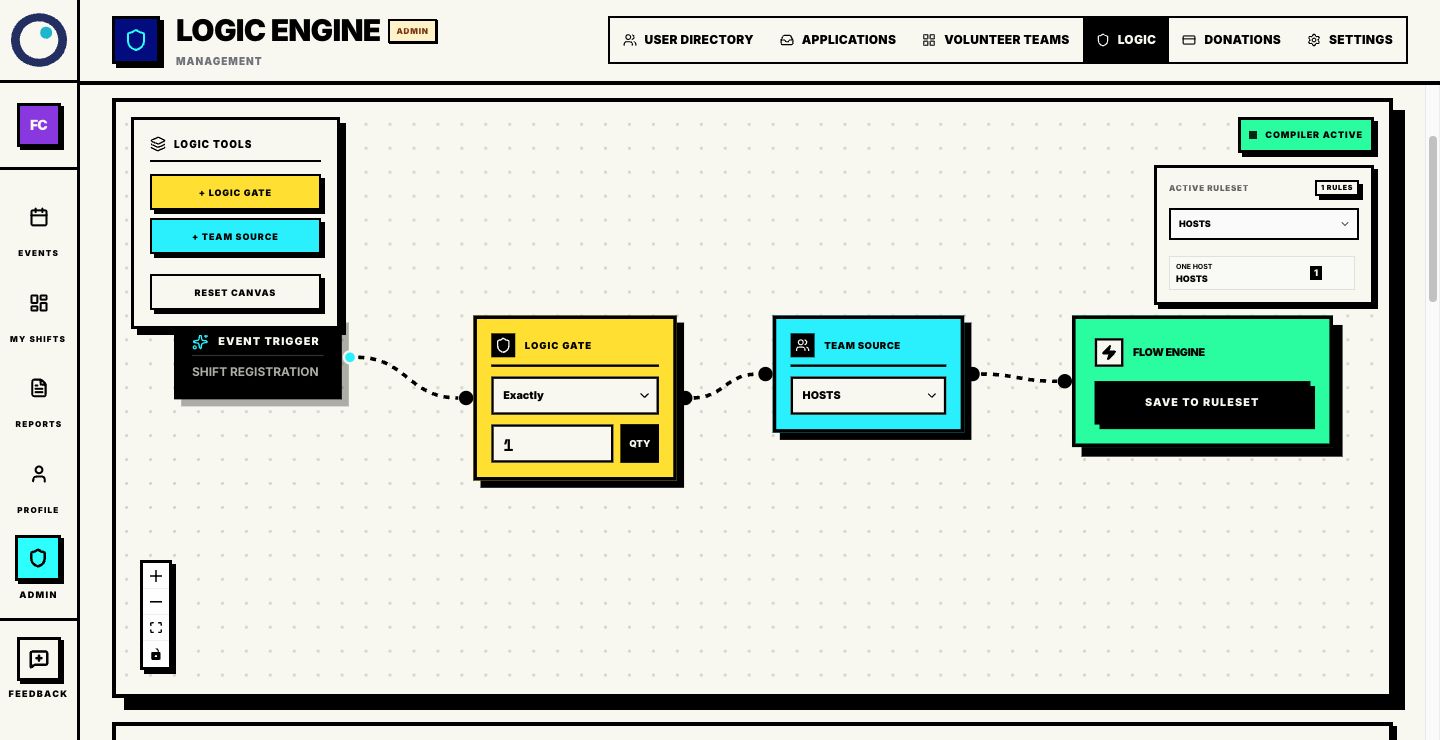
Run Auto-Schedule on the draft to match the people to the work. In the saved example, Blair hosts the morning with Indigo and Jules; Gray hosts the afternoon with Indigo and Kai. Both shifts are full and have the required mix.
Auto-Schedule saves the roster. Review the names, open places and each person's commitments before publishing.
Review commitments as well as coverage
Indigo covers both two-hour shifts: four scheduled hours. Blair, Jules, Gray and Kai each have two hours. The other seven volunteers have no assignment, so the range across the twelve-person team is 0–4 hours.
Add up each person's assigned shift lengths and compare the total with their agreed commitment. Include people without an assignment: are they unavailable for this event, missing an approved role, or waiting for an opportunity? Confirm that two shifts suit Indigo and consider who else wants to help.
For example, Finley is an approved helper available 11am–1pm. If Indigo and Finley agree to split the work, Indigo can keep the morning and Finley can take the afternoon alongside Gray and Kai. Each of the six assigned people would then have two hours, with both shifts covered.
Agree that change with both people, then update the saved afternoon assignment and check that it still has one host and two helpers. For an open place, Find cover checks suitable replacements.
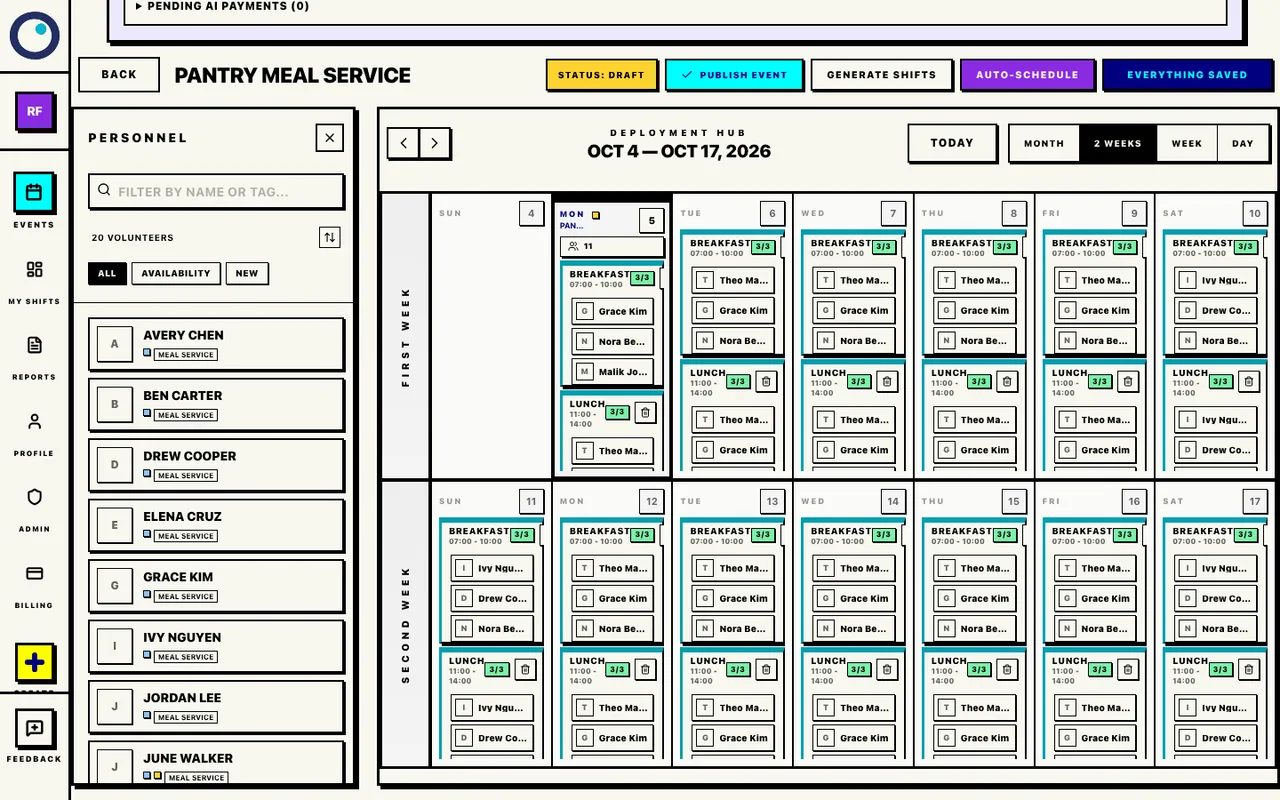
In a longer roster, open Personnel beside the calendar, as in this pantry example. Review the people list as well as the shifts so people with no assignment are considered too.
Review the people alongside the saved roster
Handle changes with the same process
When someone asks to reduce their hours, confirm the affected date and shift, find a suitable replacement, and review coverage after the change. If the underlying availability changes, update the profile hours or get a new event-specific email reply before building another roster, according to how you collected the times. Keep the same role requirements and review steps whoever makes the request.
For several changes, rebuild the draft and review the replacement roster. The pantry walkthrough shows how coverage and individual commitments can be reviewed together.
Give volunteers a clear explanation
Each shift needs one host and two helpers. We used your available times to build the roster and checked the scheduled commitments before sharing it. Please contact the coordinator if your time or role needs to change.
Give each person their job, arrival and finish times, meeting point and a contact for changes.
Prepare the approved roles and availability, let Proximatic build the roster, and review the names and commitments together. The role scheduling guide shows how to set the required mix on the actual canvas.