Everyone Wants Runner. Your Swim Meet Still Needs Timers.
By Proximatic
Two adults choose Runner as their first preference. There's one Runner place and an empty Timer job. You need to work out who takes each job before sending the meet roster.
Ask which other jobs people are willing to do. That answer gives you room to fill the meet when the first choices don't line up with the work.
The Orcas' 2026 worker-signup process uses Google Form preferences to build an assigned schedule. The board allows adjustments before locking the roster, and uses a draw when several families choose a one-person job.
Give yourself more than a first choice
For a November 7 meet, suppose Runner, Timer and Official each need one adult from 8–11am, including the briefing.
These four adults can cover 8–11am:
| Adult | First choice | Also willing |
|---|---|---|
| Alex | Runner | Timer |
| Blair | Runner | — |
| Casey | Official | — |
| Devon | Timer | — |
Casey is approved for Official. Alex, Blair and Devon are approved for their listed poolside jobs. Sleepy Hollow's team guidance makes the same practical distinction between experienced, trained officials and general poolside work.
Assign Blair to Runner, Alex to Timer and Casey to Official. Blair can only take Runner; Alex is happy to take Timer. All three jobs are filled, and Devon is available for later cover.
Across a whole meet, you're making that choice over and over while keeping track of availability and training. Every late change sends you back through the list.
Tell people the job they're doing
Send Alex the Timer assignment:
November 7 swim meet — Timer, 8–11am. Report to the volunteer desk at 8am for the briefing. Please confirm you can take this job, and let the coordinator know if your plans change.
Give people an adjustment deadline before you settle the roster. Alex can raise a problem with Timer while there's still time to arrange something else.
Fill a late vacancy without reopening every job
Cover the Timer job
One vacancy. Keep the other jobs settled.
November 7 · 8–11am
Alex cancels
Timer needs cover for the full 8–11am duty.
Ask Devon
Approved for Timer and available 8–11am.
Devon agrees
Assign Timer and send the duty details.
Blair stays on Runner. Casey stays on Official.
Suppose Alex becomes unavailable after the roster is shared. Timer needs cover, while Blair and Casey keep their jobs.
Ask Devon to take the full 8–11am duty. Devon agrees, so put Devon on Timer and send the duty details. Let Alex know the replacement is arranged. The change is settled without asking the whole team to choose jobs again.
Run the meet roster in Proximatic
Proximatic matches the meet's approved people and their availability to the jobs you need filled. Add the jobs and times, run free Auto-Schedule, then review the roster and any open places before sharing it.
Swim meet jobs
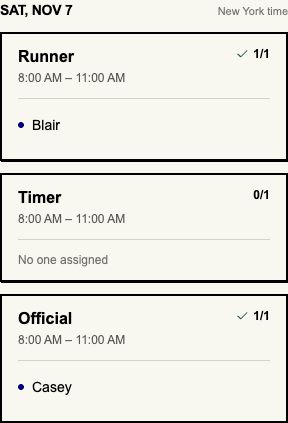
When someone cancels, use Find cover for that job. It helps you find and assign a replacement while keeping the other placements.
Set up your next meet with the jobs you need filled. For parents working around their children's games, use the tournament scheduling example.