Fundraising Dinner Volunteer Staffing: Give Every Helper a Clear Job
By Proximatic
Build the helper roster from the dinner's run-of-show: what must happen, when it starts, how many people you need and who hands the job over. Keep table reservations on the dinner page and volunteer jobs on a separate helper event. Guests need to manage their table; helpers need to know where to report and what they are covering.
That separation makes the busiest part of the evening easier to run. The welcome team can answer guest questions while the volunteer lead checks whether the service crew has arrived.
Describe the helper jobs in Proximatic and it creates the shifts and assignments together, using approved volunteers and their saved availability. You review the roster and open places. With Pro, email availability replies can prepare the draft roster too, before you publish and ask helpers to confirm their shifts.
Create my dinner helper roster.
Start with the evening, then add the people
For a dinner with doors at 6pm, service ending at 9pm and cleanup finishing at 10pm, discuss the plan with the venue and caterer first. Decide which jobs belong to their staff and which are suitable for your volunteers.
Here is a worked helper plan you can adjust:
- Room setup: four helpers, 3–5pm. Set out signs and agreed room materials; hand the room to Morgan before the crew leaves.
- Welcome desk: three helpers, 5:30–7:30pm. Brief before doors open, greet arrivals and refer table questions to the guest coordinator.
- Service support: four helpers, 6–9pm. Work with the caterer's lead on the agreed clearing and support jobs.
- Runners: two helpers, 5:30–9pm. Keep supplies moving and pass urgent requests to Morgan.
- Cleanup: four helpers, 9–10pm. Receive the room from the service lead and finish the venue's closing checklist.
Morgan is the separate volunteer lead from 3–10pm. At the busiest point, 6–7:30pm, this plan needs ten people: three at welcome, four supporting service, two runners and Morgan.
These are starting counts for this dinner. Walk through the room and timing with the venue to adjust them. Arrange the lead's break coverage too; a seven-hour lead shift needs a named person who can take over.
Create the helper roster from one event description
Put those jobs into Describe your event:
Plan our Dinner Helpers event on November 21, 2026. We need 4 people for Room setup, 3–5pm; 3 at the Welcome desk, 5:30–7:30pm; 4 for Service support, 6–9pm; 2 Runners, 5:30–9pm; 4 for Cleanup, 9–10pm; and 1 Volunteer lead, 3–10pm. Use our approved volunteers and their saved availability. Leave unfilled places open for signup.
Review the draft and check that the agreed lead and helpers have the right jobs. Add the venue's meeting points and handover instructions, then check the open places before publishing. The AI setup guide shows the textbox and draft review.
Put each job in the volunteer event
Create a Standard event for the helper shifts. Include the meeting point, lead contact, briefing time, tasks and finish time in the role instructions. Standard signup and attendance tools are free; the paid Gala handles table reservations separately.
Choose a dinner helper role and time in Proximatic
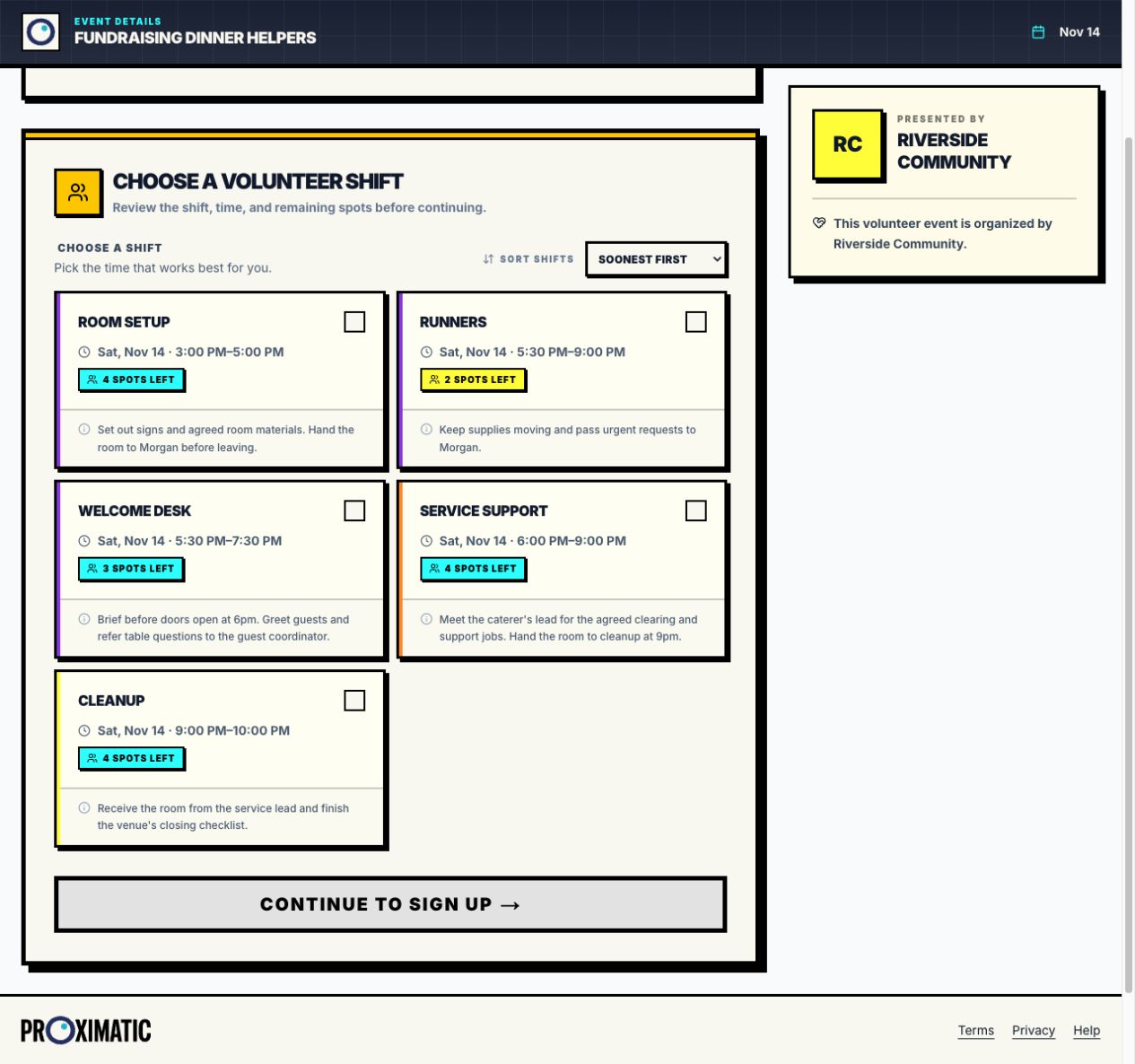
Use clear shift descriptions so someone can decide whether the job and time suit them. If a setup helper also wants to do cleanup, confirm both commitments with them. A free gap in the schedule does not mean they have agreed to return later.
Need fresh availability? Prepare an upcoming draft with custom helper shifts. With Pro, choose Request availability, check the recipient teams and select Send request. Helpers reply with their date and hours; Proximatic asks about unclear answers and prepares the private roster. Newly saved Pro AI drafts start outreach to their approved roster teams automatically. Review assignments before publishing; assigned helpers then receive requests to confirm their shifts. See the worked email availability example.
Make the handovers visible
Open each helper shift and check the receiving person and handover time. Put the actual meeting point and contact beside the job so volunteers can find the next lead.
At 5pm, setup tells Morgan what is ready and what still needs attention. At 5:30, welcome and runners meet for their briefing. At 6, the service lead confirms the support crew is in place.
Before welcome finishes at 7:30, give the guest coordinator the remaining arrival questions. At 9, service hands the room to cleanup and identifies any supplies or areas that still need work. The closing lead confirms the venue checklist is complete before helpers leave.
Put the meeting points and handover contacts in the shift instructions. People should be able to find the next person without searching for the organizer across the ballroom.
Send two links with two clear purposes
Use this plan in your invitations:
For dinner guests and table owners
Reserve your table and read the dinner details: [insert public Gala link]. After booking, open Manage Table Guests to finish your group's names by [guest deadline]. Table questions go to [guest coordinator].
For volunteers
Choose your helper role and time: [insert public Standard volunteer-event link]. Meet [volunteer lead] at [meeting point] at the start of your shift. Please tell the lead promptly if your plans change.
The paid dinner page answers reservation questions. The helper roster answers who is covering a job and when. Send any private signup-management link only to the person it belongs to.
Check helpers in against their own shifts
Open the Standard helper roster at the briefing and confirm which assigned volunteers have arrived. Display the QR check-in for the relevant helper role if you are using it. Ask helpers to check out when they finish so the volunteer-hours report reflects their recorded time.
Use the table guest list for dinner arrivals. A helper check-in records a volunteer's shift; it does not check in the people at their dinner table.
Follow the volunteer signup workflow for the helper event and the fundraising dinner walkthrough for reservations. Give both teams a clear link, a named lead and a plan they can follow.